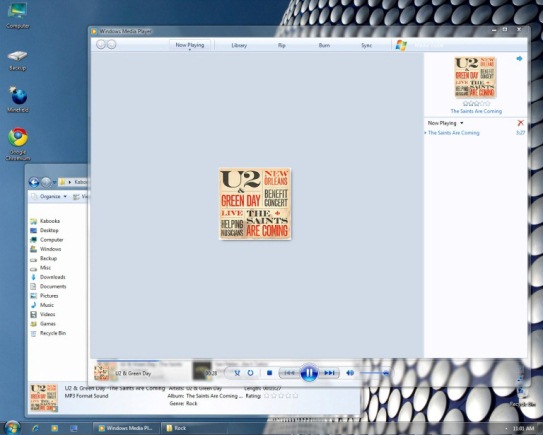
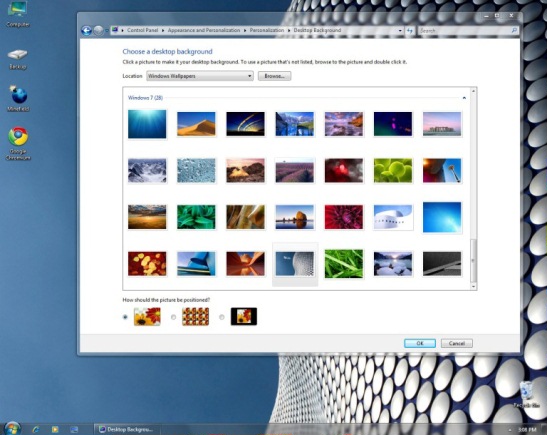
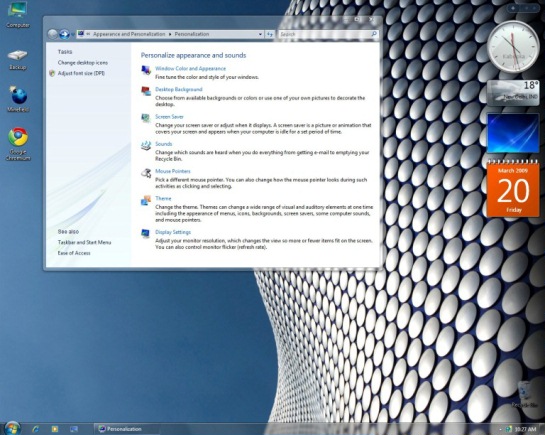
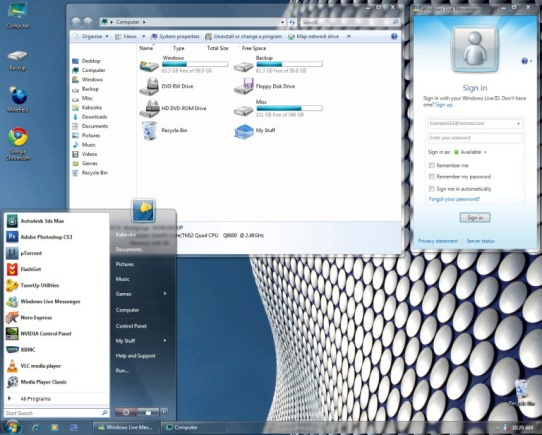
Langsung saja ini screenshot Theme Windows 7 untuk Vista...
Download disini (include instruksinya)
Peace

Read more...
Langsung saja ini screenshot Theme Windows 7 untuk Vista...
Download disini (include instruksinya)
Peace
Tampilan Office 2007 dari Microsoft memang sangat menjanjikan, terutama fitur Ribbon -nya. Wiss mantap. Tapi ada kalanya fitur ini jadi pisau bermata dua. Tidak jarang banyak mengeluhkan susahnya penggunaan Office 2007 gara-gara si Ribbon. Walah... net Surfer rasa ni orang belom siap dengan yang namanya perubahan. Tapi nda papa perbedaan itu kan perlu.
Nah bagi anda yang susah beradaptasi dengan Ribbon-nya Office 2007 atau bagi mereka yang ingin bernostalgia dengan Office yang lama, gunakan saja UbitMenu. Freeware kecil ini akan mengganti interface Office 2007 anda ke Office 2003. Silahkan lihat screenshot dibawah: Bagaimana bagus bukan? Yang berminat silahkan unduh disini!
Linknya langsung ditranslate dengan Google karena website aslinya berbahasa German!
*** link bahasa Inggris klik disini!
Aplikasi Ubitmenu sendiri ada pilihan bahasa Inggris jadi tenang saja ya.... he he! Moga bermanfaat....
Peace

Akhirnya Microsoft merelakan IE 8 "hanya" menjadi fitur tambahan dari OS Windows 7. Artinya jika kita tidak menggunakan IE 8 maka fitur IE 8 bisa kita matikan. Secara tidak langsung ini juga membantu user Windows untuk meningkatkan keamanan OS-nya. Karena sebagian besar serangan memang berasal dari celah-celah di browser IE yang terintegrasi langsung dengan "jeroan" si Windows. Mungkin juga ini akibat perseteruannya si Microsoft dengan Uni Eropa tentang pemaksaan pemakaian IE sebagai browser dalam Windows...
Terlepas dari itu semua, masih banyak aplikasi pihak ketiga yang memerlukan enginenya IE. Karena pada dasarnya setiap OS memang memerlukan sebuah HTML rendering engine. Well kita tunggu saja berita resminya dari si Microsoft.
Lebih lanjut tentang IE 8 "yang hanya" menjadi fitur tambahan bisa dilihat disini!
Peace
Microsoft, Google dan Yahoo sepakat mendukung tag yang bernama "Canonical" untuk membantu search engine mengenali link-link ke suatu halaman yang sama.
Misalnya disini sebagai sample:
http://www.example.com/product.php?item=swedish-fish
(Net Surfer namakan link ini sampleA)
Kemudian ada satu link lagi yang menuju ke halaman yang sama:
http://www.example.com/product.php?item=swedish-fish&category=gummy-candy
Satu lagi link yang menuju ke halaman yang sama:
http://www.example.com/product.php?item=swedish-fish&trackingid=1234&sessionid=5678  Sebenarnya search engine sudah bisa mengindeks halaman product.php ini, cuma yang diindeks cuma satu dan itupun ditentukan oleh search engine.
Nah untuk menghasilkan hasil pencarian yang tepat mengarah ke URL yang tepat pula, maka tag Canonical ini akan sangat berguna. Terutama untuk menentukan link mana yang cocok untuk menjadi link popularity di SEO. Atau simplenya menentukan link yang cocok untuk diindeks search engine.
sampleA akan Net Surfer jadikan Canonical. Penulisannya:
link rel="canonical" href="http://www.example.com/product.php?item=swedish-fish"/
(jangan lupa isi tanda <> ya....)
ditambahkan dibagian header semua halaman (pada source code) yang bukan canonical yakni di:
http://www.example.com/product.php?item=swedish-fish&category=gummy-candy
&
http://www.example.com/product.php?item=swedish-fish&trackingid=1234&sessionid=5678
Lebih lanjut bisa merujuk ke link ini!
Peace
 “Windows 7 will be great for games, undoubtedly, it's all good news - it's even more robust, it's quicker relatively, and the early testing cycles are proving very promising overall. I think it'll be nothing but good news for PC gamers, but we'll have more to say on that later on this year. Ultimately we're a Windows and PC company at heart, and that's not going to change, and the development on both platforms will remain central and important. The business ebbs and flows, and there will be times when we do more on one platform than the other, but they do co-exist very nicely, and as a company we're in a pretty unique position that we have a strong legacy on PC.” begitulah pernyataan "VP of the Interactive Entertainment Business for the EMEA region"-nya Microsoft, Chris Lewis di GamesIndustry.biz
Tapi memang dunia game PC identik dengan Microsoft. Terutama fitur directX yang sampai sekarang sudah direlease versi 10.1. Kemudian katanya ni Windows 7 bakal dilengkapi dengan directX 11. Wiss mantap. Tapi platform Windows yang digemari di seluruh dunia adalah XP.
Ya XP memang salah satu OS paling sukses dari Microsoft. Nda rewel dan ramah hardware, beda dengan penerusnya Vista. Tentunya jika Windows 7 bisa menyamai kemudahan XP terutama dari segi hardware, tentunya akan dapat mendulang sukses besar seperti XP.
Bagi yang pernah memakai Windows 7 beta silahkan dibandingkan sendiri dengan XP dan Vista. Net Surfer sendiri setelah mencoba Windows 7 beta merasakan bahwa Windows 7 beta lebih ringan dan ramah hardware daripada Vista. Namun XP tetap jauh lebih ringan diantara keduanya (Vista & Windows 7) dari sisi hardware!
Lebih lanjut disini
Peace

Application = Command
Accessibility Controls = access.cpl
Add Hardware Wizard = hdwwiz.cpl
Add/Remove Programs = appwiz.cpl
Administrative Tools = control admintools
Automatic Updates = wuaucpl.cpl
Bluetooth Transfer Wizard = fsquirt
Calculator = calc
Certificate Manager = certmgr.msc
Character Map = charmap
Check Disk Utility = chkdsk
Clipboard Viewer = clipbrd
Command Prompt = cmd
Component Services = dcomcnfg
Computer Management = compmgmt.msc
Date and Time Properties = timedate.cpl
DDE Shares = ddeshare
Device Manager = devmgmt.msc
Direct X Control Panel (If Installed)* = directx.cpl
Direct X Troubleshooter = dxdiag
Disk Cleanup Utility = cleanmgr
Disk Defragment = dfrg.msc
Disk Management = diskmgmt.msc
Disk Partition Manager = diskpart
Display Properties = control desktop/desk.cpl
Dr. Watson System Troubleshooting Utility = drwtsn32
Driver Verifier Utility = verifier
Event Viewer = eventvwr.msc
File Signature Verification Tool = sigverif
Findfast = findfast.cpl
Folders Properties = control folders
Fonts = control fonts
Fonts Folder = fonts
Free Cell Card Game = freecell
Game Controllers = joy.cpl
Group Policy Editor (XP Prof) = gpedit.msc
Hearts Card Game = mshearts
Iexpress Wizard = iexpress
Indexing Service = ciadv.msc
Internet Properties = inetcpl.cpl
IP Configuration = ipconfig
Java Control Panel (If Installed) = jpicpl32.cpl
Java App. Cache Viewer (If Installed) = javaws
Keyboard Properties = control keyboard
Local Security Settings = secpol.msc
Local Users and Groups = lusrmgr.msc
Logs You Out Of Windows = logoff
Microsoft Chat = winchat
Minesweeper Game = winmine
Mouse Properties = control mouse
Mouse Properties = main.cpl
Network Connections = control netconnections
Network Connections = ncpa.cpl
Network Setup Wizard = netsetup.cpl
Notepad = notepad
Nview Desktop Manager (If Installed) = nvtuicpl.cpl
Object Packager = packager
ODBC Data Source Administrator = odbccp32.cpl
On Screen Keyboard = osk
Opens AC3 Filter (If Installed) = ac3filter.cpl
Password Properties = password.cpl
Performance Monitor = perfmon.msc
Performance Monitor = perfmon
Phone and Modem Options = telephon.cpl
Power Configuration = powercfg.cpl
Printers and Faxes = control printers
Printers Folder = printers
Private Character Editor = eudcedit
Quicktime (If Installed) = QuickTime.cpl
Regional Settings = intl.cpl
Registry Editor = regedit
Registry Editor = regedit32
Remote Desktop = mstsc
Removable Storage = ntmsmgr.msc
Removable Storage Operator Requests = ntmsoprq.msc
Resultant Set of Policy (XP Prof) = rsop.msc
Scanners and Cameras = sticpl.cpl
Scheduled Tasks = control schedtasks
Security Center = wscui.cpl
Services = services.msc
Shared Folders = fsmgmt.msc
Shuts Down Windows = shutdown
Sounds and Audio = mmsys.cpl
Spider Solitare Card Game = spider
SQL Client Configuration = cliconfg
System Configuration Editor = sysedit
System Configuration Utility = msconfig
System File Checker Utility = sfc
System Properties = sysdm.cpl
Task Manager = taskmgr
Telnet Client = telnet
User Account Management = nusrmgr.cpl
Utility Manager = utilman
Windows Firewall = firewall.cpl
Windows Magnifier = magnify
Windows Management Infrastructure = wmimgmt.msc
Windows System Security Tool = syskey
Windows Update Launches = wupdmgr
Windows XP Tour Wizard = tourstart
Wordpad = write

Semua command diatas dijalankan di:
start menu ---> run
Slamat mencoba & Smoga berguna.. Peace!
Bagaimana kabar dunia IT hari ini? Bagaimana kabar dunia Global belakangan ini?
Berikut cuplikannya...
Mudah-mudahan berguna
Peace


